How to unlock iPhone?

If you have set up Face ID or Touch ID, really wake your iPhone and use the registered facial recognition or fingerprint to liberate it.
 
For unlock your iPhone just setup your face ID or you can also use fingerprint to unlock is you are added. But now in today iPhone it is compulsory to add face id to protect data.
 
To unlock an iPhone, you can use one of these methods:
  1. Enter the passcode
  2. Use Face ID or Touch ID if enabled.
  3. If carrier-locked, contact your carrier for unlocking instructions.
 
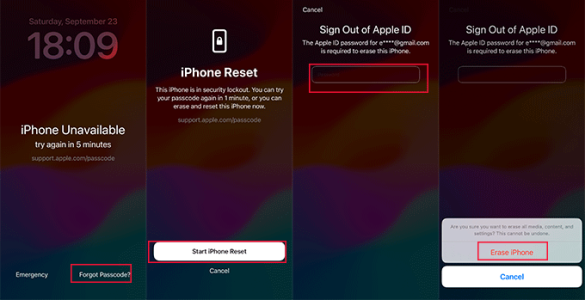
Unfortunately, if you forget your iPhone screen passcode, you'll have to sacrifice your data and settings in order to unlock it. One option is to enter the wrong passcode several times until you see the iPhone Unavailable message. Then, tap the Forgot Passcode? option in the bottom-right corner. Select iPhone Reset > Start iPhone Reset, and enter your Apple ID password to proceed.
1753924711633.png
If you have a computer available, you can also restore your iPhone using iTunes or Apple Devices on Windows, or Finder on a Mac. Of course, using a professional unlocking tool like Passixer iPhone Unlocker is another option worth considering.
 
The only way is to erase your iPhone, which removes the passcode. This will delete all your data unless you have a backup.
1. If the Find My Phone is turned off, use Finder or iTunes to put your iPhone into Recovery Mode and choose restore to reset it.
2. If the Find My Phone is turned on, use the Find My app on another Apple device or iCloud.com to erase it remotely.
3. Use an unlock tool like TunesKit iPhone Unlocker, download it on your computer, and connect your iPhone with a USB cable to unlock it.
After erasing, you can set it up as new or restore from a backup. You will need your Apple ID password to reactivate it.
 
Use Face ID or Touch ID (if set) or enter your passcode to unlock. If forgotten, use your Apple ID via Find My to erase and restore the device, or restore with iTunes/Finder in recovery mode. For carrier locks, request a SIM unlock from your carrier.
 
If you forgot iPhone screen passcode, but still remember your Apple ID passcode, you can use iCloud Find My feature to unlock your iPhone. If you do not remember your Apple ID password as well, or there is no Apple account logged in your iPhone, you can use iTunes Recovery mode or MagFone iPhone Unlocker I know to unlock your iPhone. Kindly note that there is the iCloud activation lock on your iPhone after removing iPhone screen passcode if the Find My feature is enabled on your iPhone. MagFone iPhone Unlocker can also help you bypass iCloud activation, but you need to check if your iOS version is supported to bypass iCloud activation lock.
Last words, you'd better to remember the correct password to unlock iPhone, as all of above methods would erase all of your iPhone data.

 
Short answer — depends what you mean:
  1. If you forgot the passcode / Face ID: erase the iPhone and restore from backup. Use Find My > Erase iPhone via iCloud.com or put the device in Recovery Mode and restore with a computer; then set it up again.
  2. If it’s carrier‑locked: contact the carrier that sold the phone and request an unlock (they’ll require account info and eligibility).
  3. If Activation Lock (Apple ID) is enabled: sign in to iCloud.com with the original Apple ID to remove the device, or contact Apple with proof of purchase.
 
Back
Top